> ## Documentation Index
> Fetch the complete documentation index at: https://rive-scripting-inputs.mintlify.site/llms.txt
> Use this file to discover all available pages before exploring further.
# Data Binding
Scripting allows you to read, modify, and subscribe to changes in View Model properties,
as well as create new View Model instances at runtime.
For a conceptual overview of View Models and how they drive your graphic,
see [View Models & Data Binding](/editor/data-binding/overview).
## Accessing View Models
There are two ways that a script can gain access to a View Model and its properties:
* Accessing View Models through [Context](#context)
* [View Models as an inputs](#view-models-as-inputs)
If you only need to read, not set view model properties, you can data bind view model property values to script inputs.
For more information see [Data Binding Inputs](/scripting/script-inputs#data-binding-inputs).
### Context
The `init` lifecycle function includes a `context` parameter that gives you access
to your view models. This allows you to read values (strings, enums, lists, etc.), set values,
fire triggers, listen for triggers, and subscribe to value changes.
In addition to view models, [Context](/scripting/api-reference/interfaces/context) gives you access to named assets and update scheduling.
```lua theme={null}
type GetContexts = {}
function init(self: GetContexts, context: Context): boolean
-- Get the view model from the node's immediate context.
local mainVmi = context:viewModel()
--- Get the root view model
local rootVmi = context:rootViewModel()
-- Get the view model from the parent node.
local dc = context:dataContext()
if dc then
local parentDC = dc:parent()
if parentDC then
local parentVmi = parentDC:viewModel()
end
end
return true
end
return function(): Node
return {
init = init,
}
end
```
### View Models as Inputs
You can create an [Input](/scripting/script-inputs) that accepts a view model instance, which gives the script access to its properties.
This is in addition to your main view model.
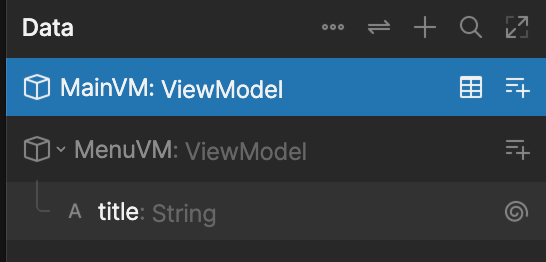
In this example, we call it `MenuVM` and give it a `string` property called `title`.
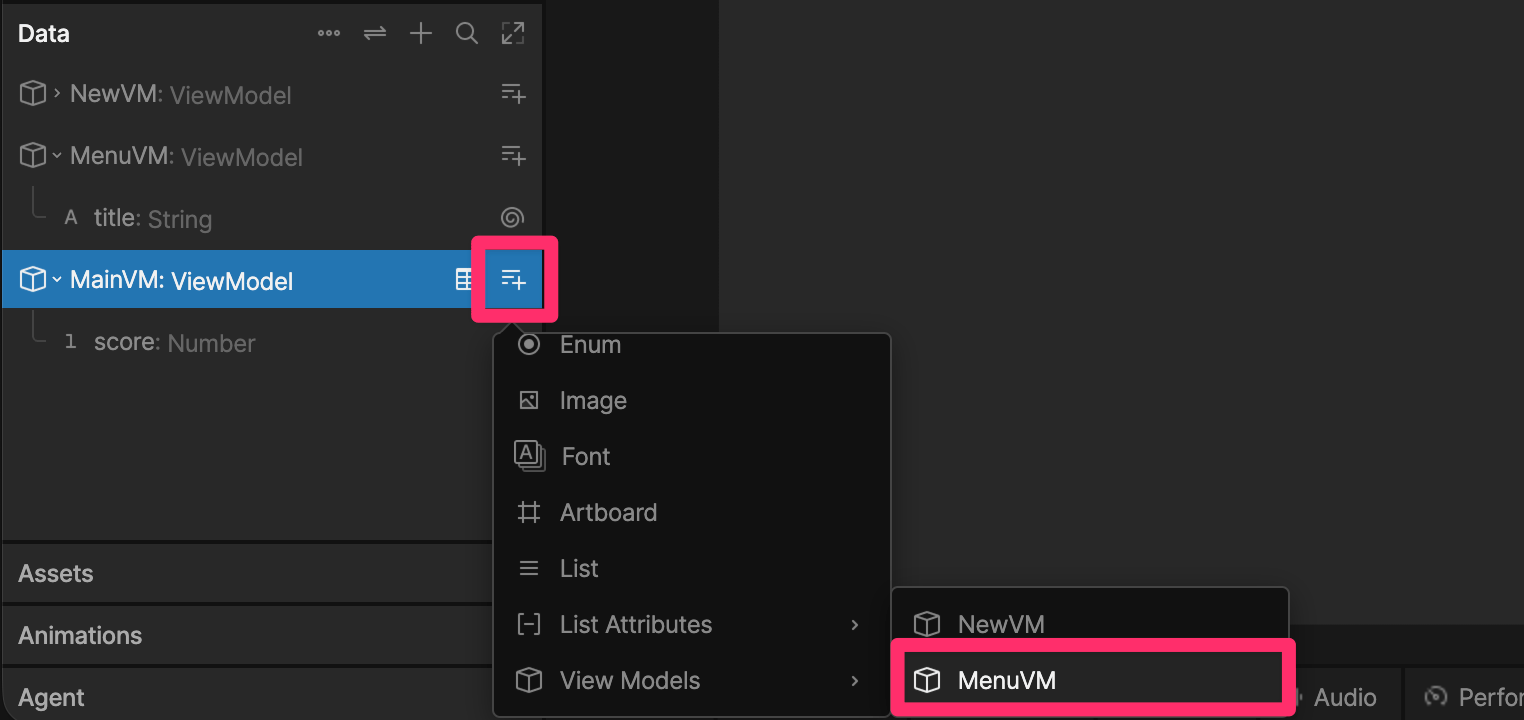
 To be able to reference the instance of `MenuVM` in your script, we need to create a `myMenu` property of type `MenuVM` in the main view model.
 In your script add a new input of type `Data.MenuVM`.
```lua {3,8,17} theme={null}
-- Define the script's data and inputs.
type ScriptInputs = {
myMenu: Input,
}
-- Called once when the script initializes.
function init(self: ScriptInputs, context: Context): boolean
print(self.myMenu.title.value)
return true
end
-- Return a factory function that Rive uses to build the Node instance.
return function(): Node
return {
init = init,
myMenu = late(),
}
end
```
Select the script in your hierarchy and in the Property Group panel of the Inspector, set the `myMenu` input to `menu`.
## Reading and Setting Properties
The following methods allow you to reference view model properties:
* [getNumber](/scripting/api-reference/interfaces/view-model#getnumber)
* [getTrigger](/scripting/api-reference/interfaces/view-model#gettrigger)
* [getString](/scripting/api-reference/interfaces/view-model#getstring)
* [getBoolean](/scripting/api-reference/interfaces/view-model#getboolean)
* [getColor](/scripting/api-reference/interfaces/view-model#getcolor)
* [getList](/scripting/api-reference/interfaces/view-model#getlist)
* [getViewModel](/scripting/api-reference/interfaces/view-model#getviewmodel)
* [getEnum](/scripting/api-reference/interfaces/view-model#getenum)
```lua {5,8,11,15,18} theme={null}
local vmi = context:viewModel()
if vmi then
-- Get a reference to the score property from the view model
local score = vmi:getNumber('score')
if score then
-- Read the score
print(score.value)
-- Set the score
score.value = 100
end
-- Get a reference to the myTrigger property from the view model
local myTrigger = vmi:getTrigger('myTrigger')
if myTrigger then
-- Fire the trigger
mytrigger:fire()
end
end
```
## Listening for Property Changes
### Add a Listener
Use `addListener` to listen for triggers or changes to view model properties.
```lua {19,22,23,24} theme={null}
-- Define the script's data and inputs.
type ScriptInputs = {
menu: Input,
}
function onTitleChange()
print('changed')
end
function onTitleChangeWithParam(self: ScriptInputs)
print('changed', self.menu.title.value)
end
-- Called once when the script initializes.
function init(self: ScriptInputs, context: Context): boolean
local title = self.menu.title
-- When title changes, call onTitleChange
title:addListener(onTitleChange)
-- When title changes, call onTitleChangeWithParam with an argument of self
title:addListener(self, onTitleChangeWithParam)
return true
end
-- Return a factory function that Rive uses to build the Node instance.
return function(): Node
return {
init = init,
score = 0,
menu = late(),
newArtboard = late(),
}
end
```
### Remove a Listener
Always remove listeners when they are no longer needed to avoid memory leaks.
```lua highlight={14} theme={null}
-- Define the script's data and inputs.
type ScriptInputs = {
menu: Input,
}
-- Anchor-form listener callback: receives the same object passed as the
-- anchor to addListener (here, the `title` Property itself).
function onTitleChangeWithParam(title: Property)
print('title changed:', title.value)
-- Unsubscribe using the matching anchor-form overload (self, anchor, callback).
-- The simpler (self, callback) overload requires a zero-argument callback,
-- which is why using it here caused a type error against this 1-argument function.
title:removeListener(title, onTitleChangeWithParam)
end
-- Called once when the script initializes.
function init(self: ScriptInputs, context: Context): boolean
local title = self.menu.title
-- When title changes, call onTitleChangeWithParam with the anchor (title) as its argument.
title:addListener(title, onTitleChangeWithParam)
return true
end
-- Return a factory function that Rive uses to build the Node instance.
return function(): Node
return {
init = init,
menu = late(),
}
end
```
## Creating a View Model Instance
```lua highlight={10} theme={null}
-- Define the script's data and inputs.
type ScriptInputs = {
menu: Input,
}
-- Called once when the script initializes.
function init(self: ScriptInputs, context: Context): boolean
-- Create a brand new MenuVM ViewModel instance programmatically
-- (instead of relying on the data-bound `menu` input from the editor).
local newMenuInstance = Data.MenuVM.new()
local newTitle = newMenuInstance:getString('title')
if newTitle then
newTitle.value = 'Created at runtime'
end
-- Swap self.menu to use the instance we just created programmatically.
self.menu = newMenuInstance
local title = self.menu.title
print('menu title after programmatic creation:', title.value)
return true
end
-- Return a factory function that Rive uses to build the Node instance.
return function(): Node
return {
init = init,
menu = late(),
}
end
```
In your script add a new input of type `Data.MenuVM`.
```lua {3,8,17} theme={null}
-- Define the script's data and inputs.
type ScriptInputs = {
myMenu: Input,
}
-- Called once when the script initializes.
function init(self: ScriptInputs, context: Context): boolean
print(self.myMenu.title.value)
return true
end
-- Return a factory function that Rive uses to build the Node instance.
return function(): Node
return {
init = init,
myMenu = late(),
}
end
```
Select the script in your hierarchy and in the Property Group panel of the Inspector, set the `myMenu` input to `menu`.
## Reading and Setting Properties
The following methods allow you to reference view model properties:
* [getNumber](/scripting/api-reference/interfaces/view-model#getnumber)
* [getTrigger](/scripting/api-reference/interfaces/view-model#gettrigger)
* [getString](/scripting/api-reference/interfaces/view-model#getstring)
* [getBoolean](/scripting/api-reference/interfaces/view-model#getboolean)
* [getColor](/scripting/api-reference/interfaces/view-model#getcolor)
* [getList](/scripting/api-reference/interfaces/view-model#getlist)
* [getViewModel](/scripting/api-reference/interfaces/view-model#getviewmodel)
* [getEnum](/scripting/api-reference/interfaces/view-model#getenum)
```lua {5,8,11,15,18} theme={null}
local vmi = context:viewModel()
if vmi then
-- Get a reference to the score property from the view model
local score = vmi:getNumber('score')
if score then
-- Read the score
print(score.value)
-- Set the score
score.value = 100
end
-- Get a reference to the myTrigger property from the view model
local myTrigger = vmi:getTrigger('myTrigger')
if myTrigger then
-- Fire the trigger
mytrigger:fire()
end
end
```
## Listening for Property Changes
### Add a Listener
Use `addListener` to listen for triggers or changes to view model properties.
```lua {19,22,23,24} theme={null}
-- Define the script's data and inputs.
type ScriptInputs = {
menu: Input,
}
function onTitleChange()
print('changed')
end
function onTitleChangeWithParam(self: ScriptInputs)
print('changed', self.menu.title.value)
end
-- Called once when the script initializes.
function init(self: ScriptInputs, context: Context): boolean
local title = self.menu.title
-- When title changes, call onTitleChange
title:addListener(onTitleChange)
-- When title changes, call onTitleChangeWithParam with an argument of self
title:addListener(self, onTitleChangeWithParam)
return true
end
-- Return a factory function that Rive uses to build the Node instance.
return function(): Node
return {
init = init,
score = 0,
menu = late(),
newArtboard = late(),
}
end
```
### Remove a Listener
Always remove listeners when they are no longer needed to avoid memory leaks.
```lua highlight={14} theme={null}
-- Define the script's data and inputs.
type ScriptInputs = {
menu: Input,
}
-- Anchor-form listener callback: receives the same object passed as the
-- anchor to addListener (here, the `title` Property itself).
function onTitleChangeWithParam(title: Property)
print('title changed:', title.value)
-- Unsubscribe using the matching anchor-form overload (self, anchor, callback).
-- The simpler (self, callback) overload requires a zero-argument callback,
-- which is why using it here caused a type error against this 1-argument function.
title:removeListener(title, onTitleChangeWithParam)
end
-- Called once when the script initializes.
function init(self: ScriptInputs, context: Context): boolean
local title = self.menu.title
-- When title changes, call onTitleChangeWithParam with the anchor (title) as its argument.
title:addListener(title, onTitleChangeWithParam)
return true
end
-- Return a factory function that Rive uses to build the Node instance.
return function(): Node
return {
init = init,
menu = late(),
}
end
```
## Creating a View Model Instance
```lua highlight={10} theme={null}
-- Define the script's data and inputs.
type ScriptInputs = {
menu: Input,
}
-- Called once when the script initializes.
function init(self: ScriptInputs, context: Context): boolean
-- Create a brand new MenuVM ViewModel instance programmatically
-- (instead of relying on the data-bound `menu` input from the editor).
local newMenuInstance = Data.MenuVM.new()
local newTitle = newMenuInstance:getString('title')
if newTitle then
newTitle.value = 'Created at runtime'
end
-- Swap self.menu to use the instance we just created programmatically.
self.menu = newMenuInstance
local title = self.menu.title
print('menu title after programmatic creation:', title.value)
return true
end
-- Return a factory function that Rive uses to build the Node instance.
return function(): Node
return {
init = init,
menu = late(),
}
end
```